Also, you will need to create a AWS account. If you already have an AWS account, make sure that you have a user created in the IAM Management Console with the following permissions:
When creating this user, make sure you write down its ID access key and its secret access key. You will need them to configure the aws-cli client.
With this Amazon credentials, you can configure the AWS client by executing the following command:
1
aws configure
In this step, you will need to fulfill the details with the user credentials you wrote down when creating it.
Now, you will need to create a Telegram API ID. For this, you can go to the Telegram section " Create an Application". After following the steps described in the official documentation, you will obtain an API ID (it’s a number) and a API hash (it’s a string).
With these steps already completed, you can place all the needed details in the script and run it.
import boto3
import textwrap
import requests
import re
from readability import Document
from telethon import TelegramClient, events, sync
import time
import os
#--------------------------------------------------------------------# Configuration#--------------------------------------------------------------------##### Article ###### Define URLurl ="PLACE_THE_URL_HERE"##### Telegram ###### Telegram API credentialsapi_id = PLACE_API_ID_HERE
api_hash ='PLACE_API_HASH_HERE'# Telegram user to send messagestelegram_user ="PLACE_TELEGRAM_USER_HERE"# Create Telegram clienttelegram_client = TelegramClient('session_name', api_id, api_hash)
telegram_client.start()
##### AWS configuration ###### Get S3 sessionsession = boto3.Session(profile_name='default')
# Get polly clientpolly = session.client('polly')
# Create a S3 client to retrieve the file contents3 = session.client('s3')
# Define bucket namebucket_name ='PLACE_BUCKET_NAME_HERE'#--------------------------------------------------------------------# Get HTML from the article#--------------------------------------------------------------------# Get HTMLresponse = requests.get(url)
# Extract content with Readibilitydoc = Document(response.text)
# Get article bodyhtml_text = doc.summary()
# Regular expression to identify HTML tags, e.g.:html_tag_re =r"<\\?[^>]+>"# Remove HTML tags from the article bodytext_only = re.sub( html_tag_re, "", html_text,)
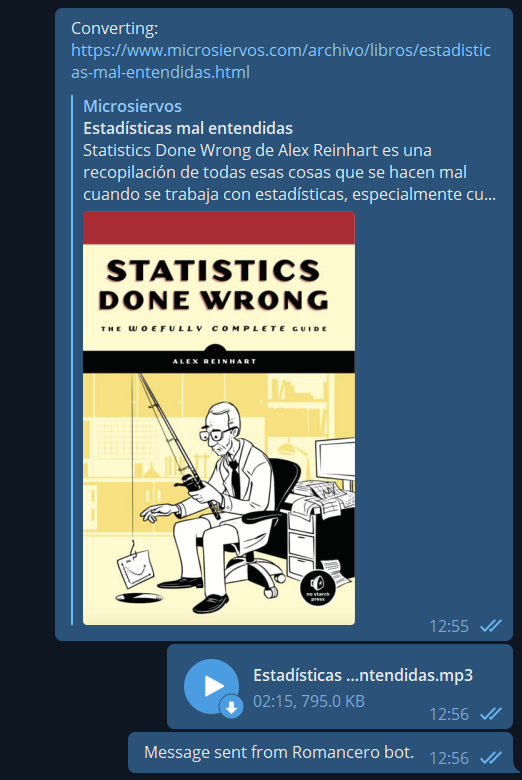
# Send message to user pointing to the URL that is going to be convertedtelegram_client.send_message(telegram_user, "Converting: %s"% url)
#--------------------------------------------------------------------# Convert text to voice#--------------------------------------------------------------------# Start Polly task to save in a Bucketresp = polly.start_speech_synthesis_task(OutputFormat='mp3',
OutputS3BucketName=bucket_name,
Text=text_only,
VoiceId='Enrique')
# Get Polly tasktask = polly.get_speech_synthesis_task(TaskId=resp['SynthesisTask']['TaskId'])
# Monitor task status until it is completedwhile task['SynthesisTask']['TaskStatus'] !='completed':
# Wait 2 seconds between server polltime.sleep(2)
# Get Polly tasktask = polly.get_speech_synthesis_task(TaskId=task['SynthesisTask']['TaskId'])
# Print the status of the taskprint("Task status: %s"% task['SynthesisTask']['TaskStatus'])
print("Task completed!")
#--------------------------------------------------------------------# Retrieve file and send to Telegram user#--------------------------------------------------------------------# Regular expression to extract the key (file name) of the synthesized filekey_re =r'/([0-9A-Za-z-.]+)$'# Search the regular expression in the OutputUriregex_search = re.search(key_re, task['SynthesisTask']['OutputUri'])
# Take only the first group of the re (key)file_key = regex_search.group(1)
# Get file name to store in localtitle_sanitized = doc.short_title().replace('"', '')
title_sanitized = title_sanitized.replace(':', '')
file_name ="%s.mp3"% title_sanitized
# Download file from the bucket and store it in a MP3 local filewithopen(file_name, 'wb') as data:
s3.download_fileobj(bucket_name, file_key, data)
# Delete remote bucket files3.delete_object(Bucket=bucket_name,Key=file_key)
# Delete local fileif os.path.isfile(file_key):
os.remove(file_key)
# Send MP3 file as a voice note to the telegram usertelegram_client.send_file(telegram_user, file_name, voice_note=True)
# Send signaturetelegram_client.send_message(telegram_user, "Message sent from Romancero bot.")
The user you specified will receive a message like this: